FR1.9 is how operators and some reseller notes refer to a 2026-era Bitmain firmware stream for the Z15 Pro family. Exact filenames on Bitmain’s download page use dated .bmu labels — always trust the file Bitmain lists for your model, not a nickname on Telegram.
This page summarises publicly discussed failure modes and a conservative stance. It is not an official Bitmain bulletin. When in doubt, email Bitmain Support with your serial and current build string.
What goes wrong for some units
- Update appears to finish cleanly.
- Miner UI returns, but saving pool settings fails with a compile / configuration style error.
- No accepted shares on any Equihash pool until cabling or firmware is corrected.
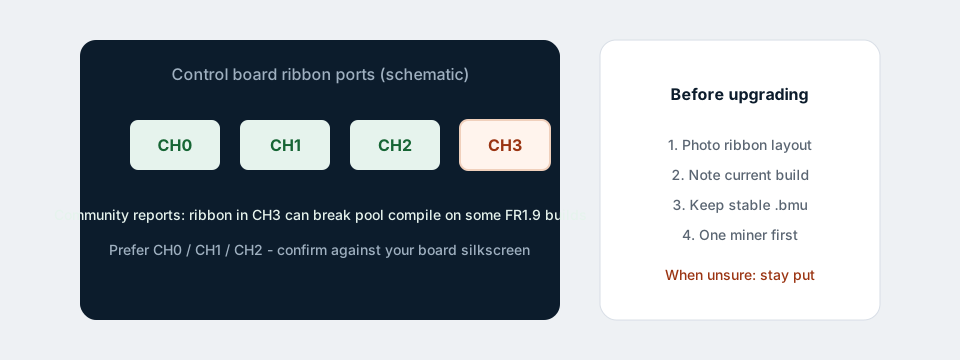
Community investigation and shared Bitmain support answers have pointed at ribbon cable placement on the control board: a cable on CH3 can trigger the failure on affected builds. Moving ribbons to the other active channels (often CH0–CH2) restored pool saves for some operators.
Should you upgrade?
Stay on your current official build if:
- The miner already holds ~860 KSol/s class hashrate and accepts shares steadily.
- You run a single home unit and have no spare control board.
- You cannot afford downtime while learning ribbon layouts.
Consider upgrading (one machine first) if:
- Bitmain’s notes for your exact file fix a bug you actually hit (security, pool protocol, stability).
- You photographed cabling, have the previous
.bmuready, and can roll back. - You verified CH3 is empty before flashing.
Upgrade procedure that reduces pain
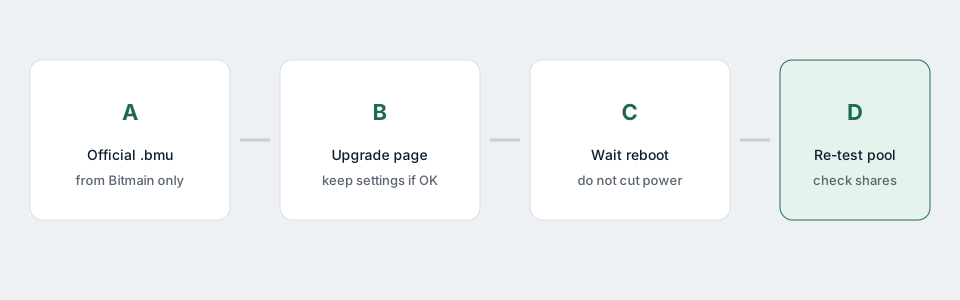
- Record current firmware version / date from the UI.
- Download only from Bitmain Support for Z15 Pro.
- Power down; confirm ribbon map; free CH3 if occupied.
- Flash; wait; re-enter pools; confirm shares.
- Only then roll the change across a fleet.
If you already flashed and lost the pool
Follow not connecting to pool after firmware update: fix pools, network, ribbons, then official rollback.
Bottom line
For most solo operators in 2026, a stable official build that already mines is better than chasing the newest label. Upgrade when Bitmain’s changelog solves your problem — not because a marketplace listing shouted “FR1.9 required”.
Related: Pool after firmware fix · Best firmware 2026 · All guides