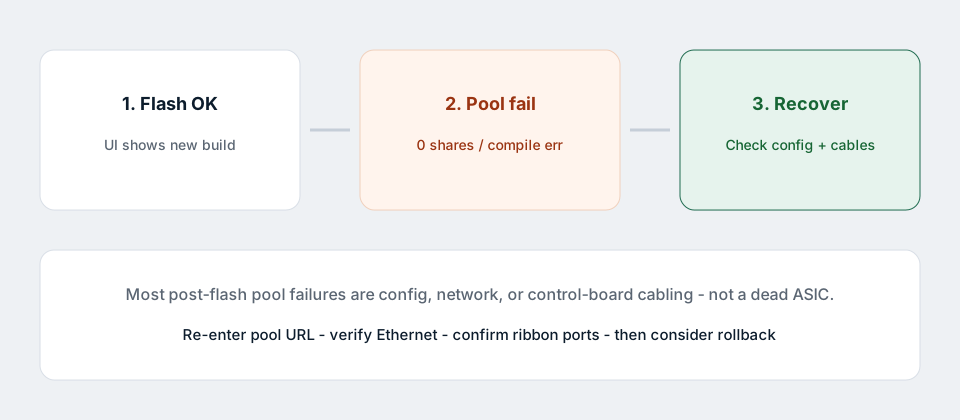
On the Antminer Z15 Pro, a firmware flash can look perfect while the miner never reconnects to stratum. That pattern shows up after official upgrades and especially after rushed third-party files. Do not keep flashing random builds. Walk the stack: settings, network, control-board cabling, then rollback.
Specs we use on this site match Bitmain Support for the current 860 KSol/s class Z15 Pro (~2780 W). Full first boot: setup guide.
Confirm what “not connecting” means
- Web UI loads, but pool status stays dead / 0 shares.
- UI shows a compile / configuration error when saving pools.
- Miner reboots in a loop after the update.
- You never reach the UI at all (different problem — network or control board).
This article focuses on the first two. If the unit never comes back on the LAN, recover Ethernet / IP Reporter first.
1. Re-enter pool settings from scratch
Firmware upgrades sometimes clear or corrupt miner configuration even when you ticked “keep settings”.
- Open Settings and wipe Pool 1–3 fields.
- Paste the pool URL exactly as documented (protocol + host + port).
- Enter worker / wallet in the pool’s required format.
- Password is often
x— follow that pool’s help page. - Save / Apply and wait several minutes.
Wrong algorithm endpoints (non-Equihash) will never produce valid shares on a Z15 Pro.
2. Network basics after a flash
- Ethernet link light on; same subnet as your PC.
- Ping the miner IP; try another browser without VPN.
- Outbound TCP to the stratum port not blocked by firewall / ISP filter.
- DNS: if the pool URL uses a hostname, confirm the miner can resolve it (or use a documented IP endpoint if the pool publishes one).
3. Control-board ribbon layout (FR1.9-class issues)
Operator reports in 2026 have linked some newer Bitmain builds (discussed as FR1.9 in the community) to pool compile failures when a ribbon sits in a particular control-board channel (often labelled CH3). Bitmain support replies shared publicly point operators to keep ribbons on the active channels (commonly CH0–CH2) and free CH3.
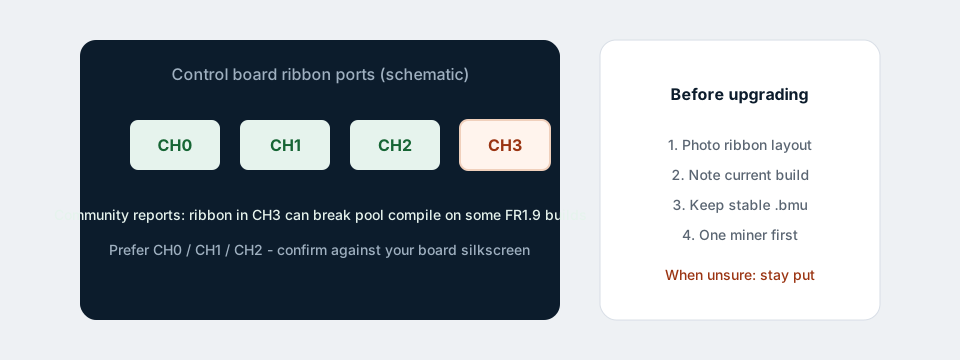
Power down, photograph the layout, reseat ribbons firmly, avoid forcing bent cables, then retry pool save. Details: FR1.9 — should you upgrade?.
4. Safe rollback to a known-good official file
If settings and cabling are clean, roll back to the last official Bitmain .bmu that mined for you.
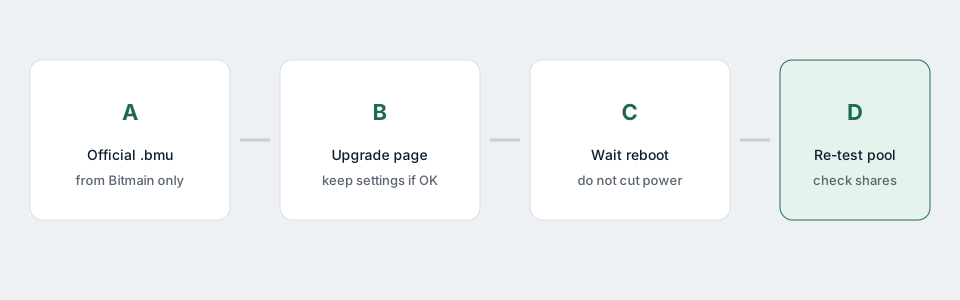
- Download the matching Z15 Pro firmware from Bitmain Support — not a forum mirror.
- Use the miner Upgrade page; wait through reboot.
- Re-enter pools; confirm accepted shares on the pool website.
If the flash fails mid-way, you may need Bitmain SD recovery for the controller — that is a different procedure; stop random retries and open a ticket with screenshots.
5. When it is not the firmware
- Pool outage or maintenance (check their status page).
- Wallet / worker typo.
- Undersized power causing brownouts that look like “disconnects” — see power & wiring.
- Missing hashboard cutting effective hash to near zero — hashboard not detected.
Checklist
- Pools retyped, Equihash URL correct
- Ethernet + ping OK
- Ribbon ports photographed and reseated
- Official rollback tested before any “boost” file
- Pool side shows worker connected
Need a hand interpreting screenshots: contact support.
Related: Best firmware 2026 · Setup guide · FR1.9 notes · All guides