The Bitmain Antminer Z15 Pro 860K is an Equihash ASIC with a typical wall draw around 2780 W (±5%) at 25°C. That is continuous industrial load, not a desktop PSU hobby project. Get the electrical side right first; pool settings can wait twenty minutes.
This guide follows Bitmain-style figures for the current 860K-class Z15 Pro (240-Z). Local electrical code always wins — if you are unsure, hire an electrician.
Voltage: 200–240 V only
The miner expects 200–240 V AC, 50/60 Hz. A normal North American 120 V wall outlet is the wrong tool. People still try it. The usual result is a dead or dying PSU and an argument about warranty.
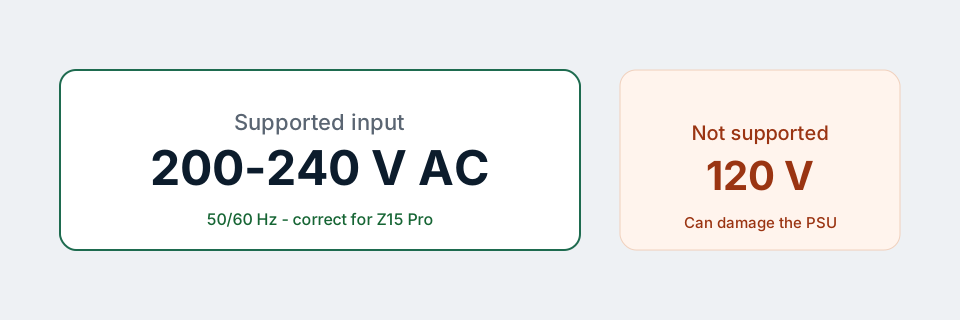
If your building only has 120 V at the wall, you need a proper 240 V circuit (or a facility that already provides it). Step-up gimmicks and random converters are how fires and insurance claims start. We will not recommend them.
Why there are two AC inputs
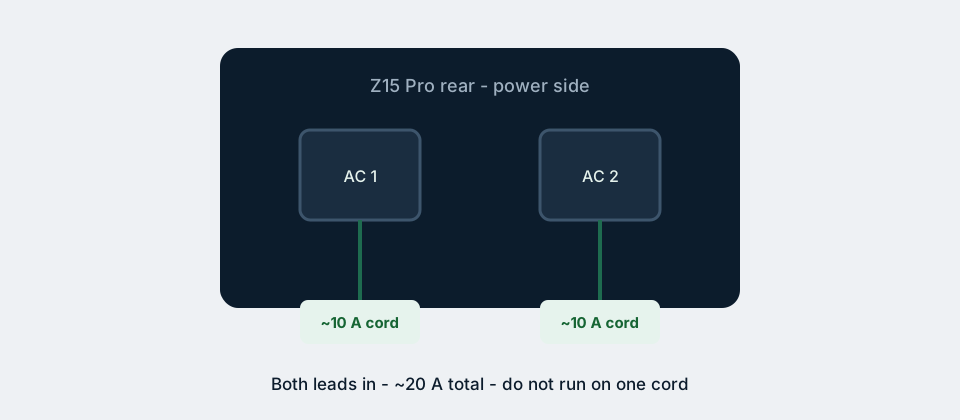
Bitmain documents roughly 20 A total across two AC inlets — about 10 A each. Both cords should be seated. Running on a single lead because “it powered on” is asking one connector and one cable to carry a load they were not sized for alone.
Power cords are often not included with ASIC shipments. Budget for two cords rated at least 10 A each, with connectors that match your PDU or receptacles. Thin consumer extension cords are not a plan.
What ~2780 W means day to day
Continuous energy use is simple maths:
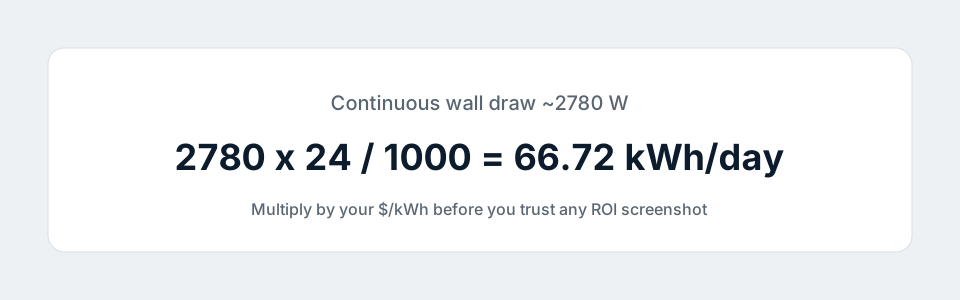
At $0.12/kWh that is about $8/day in electricity before pool fees — before you earn a single dollar of mining revenue. At $0.30/kWh the same box is a different financial animal. Plug your rate into the ROI calculator before you fall in love with hashrate screenshots.
Bitmain also talks about a higher adapted AC capacity (on the order of ~4000 W). That is headroom and infrastructure sizing language, not your average draw. Size breakers and PDUs with margin; do not aim to run a breaker at its printed limit 24/7.
Breakers, PDUs, and placement
- Prefer a dedicated circuit or a known-good PDU with clear amp ratings.
- Avoid stacking the miner behind a multi-plug strip that also feeds heaters or compressors.
- Keep intake air cool and exhaust path clear. Recirculating hot air raises watts and kills hashrate.
- Noise is high (around 75 dBA in Bitmain’s figures). Plan the room before the neighbour plans a complaint.
A PDU that reports watts is worth more than another RGB toy. When something feels “off”, a live watt reading tells you whether you are looking at a network issue or a power issue in thirty seconds.
First boot order (electrical first)
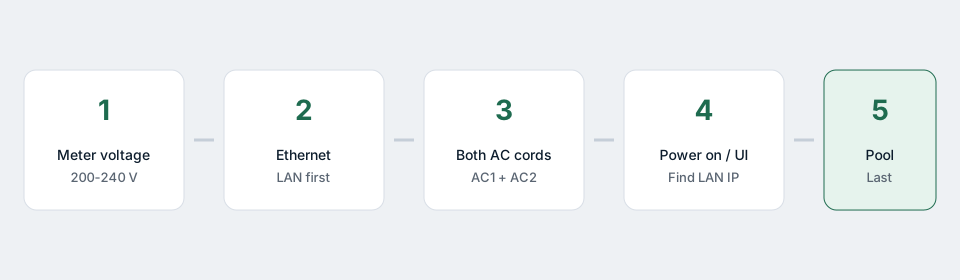
- Confirm receptacle voltage with a meter if you did not wire it yourself.
- Connect Ethernet.
- Plug both AC cords.
- Power on and find the miner UI on your LAN.
- Only then set Equihash pool / wallet / worker.
If the unit boots then brown-outs when fans ramp, your feed or cords are undersized. Fix power before you chase pool stratum errors.
Mistakes that keep showing up
- 120 V “just to test”
- One cord only
- Long, thin extension leads coiled on the floor
- Sharing a circuit with a welder, kiln, or kitchen range
- Sealed cupboard with no exhaust
Warranty processes get awkward when photos show melted plugs. Bitmain manufacturer cover (often around 180 days from delivery on new units, subject to their terms) does not turn a wiring mistake into a free replacement.
How this ties back to the 860K / 840K confusion
Some older write-ups pair “840K” branding with wattage numbers that no longer match Bitmain’s current Support sheet. For power planning, trust the ~2780 W class figure for the current Z15 Pro 860K, and read 860K vs 840K listings if the sales title still looks stuck in the past.
If you buy from us
Our Z15 Pro 860K product page assumes you already have (or will install) 200–240 V infrastructure and two proper cords. Shipping does not include household wiring. Questions about whether your country uses C13/C19 or local industrial connectors are fair game for support before the miner leaves the warehouse — better to delay a day than to fry a PSU on arrival.
Electrical work can injure people and burn buildings down. This article is operator guidance, not a certified design for your panel. When in doubt, stop and call a licensed electrician.
Related: Full setup guide · 860K vs 840K · All guides