
Antminer web UIs still default toward root/root until you change them. Exposing that UI straight to the public internet is how miners get hijacked. Remote monitoring should sit behind a VPN, reverse tunnel, or pool-side telemetry — not a naked port forward.
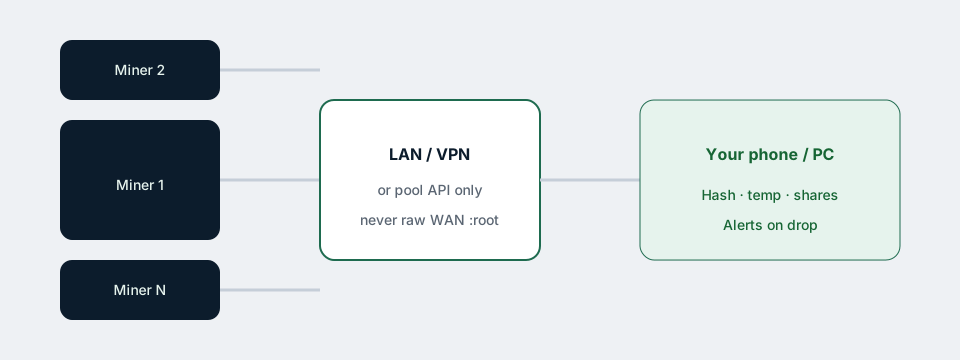
Option A — Pool dashboard (simplest)
- Each worker named clearly (
rack1-z15-01…). - Use the pool’s website / app for hashrate and offline alerts.
- Great for share acceptance; weak for board temp and fan faults.
Option B — VPN into the farm LAN (best control)
- Run WireGuard / Tailscale / OpenVPN to a small gateway on site.
- Keep miners on private DHCP reservations.
- Change every miner password; disable unused services if offered.
- Bookmark each UI or use a LAN scanner inventory.
Option C — Fleet managers / APIs
Some operators use ASIC management suites or scripts that poll miner APIs over the VPN. Whatever you pick, authenticate hard and keep software updated. Avoid cloud agents that demand custom firmware you do not trust (firmware guidance).
What to alert on
- Hashrate drop >10–15% for N minutes
- Worker offline on pool
- High board temp / fan stopped (from UI or PDU where possible)
- PDU watt plunge (often a tripped breaker)
Multi-miner hygiene
- Label physical units to match worker names.
- Same official firmware generation across the fleet when possible.
- Pilot firmware upgrades on one box first (FR1.9 caution).
- Document IP, MAC, and rack position in a simple spreadsheet.
Remote eyes do not replace good power design — see dual AC wiring.
Related: Setup · Low hashrate · All guides